
Need: architecture & capability detail

How projectEureka™ is put together

One environment on AWS, GCP, or on-prem Kubernetes. Saved flows, project storage, multi-cloud buckets, and browser workspaces.

EnvironmentAWS, GCP, or on-prem K8s
BucketsAWS S3 & GCP GCS
AppsJupyter, VS Code, desktop

Catalog, then the work

App containers open in the browser. Flow containers run inside a saved flow. Both are published at containers.projecteureka.ai. A simple install downloads a container once onto this environment.

App containers Jupyter, VS Code, RStudio, ParaView, desktop. Download, then create the app.
Flow containers OpenFOAM, GROMACS, BLAST, PyTorch. Download, then choose it on a step.
Simple install One download per container. Projects reuse what is already on the environment.
Sample flows Import a starter from the same catalog, then submit it on the project.

Apps · Flows · Environment · Storage

Where the environment runs

Deploy projectEureka™ on Amazon Web Services, Google Cloud, or on-premises Kubernetes. Attach AWS and GCP buckets to projects regardless of where the environment runs.
  • AWS or GCP: Run the environment in the cloud account and region you choose.
  • On-prem Kubernetes: Deploy where policy or data residency requires local control.
  • Apps inside that environment: Jupyter, VS Code, Linux desktop, and other launchers.
  • Company capability: Omnibond has delivered cloud HPC at extreme scale (see below); that engineering depth sits behind the platform.
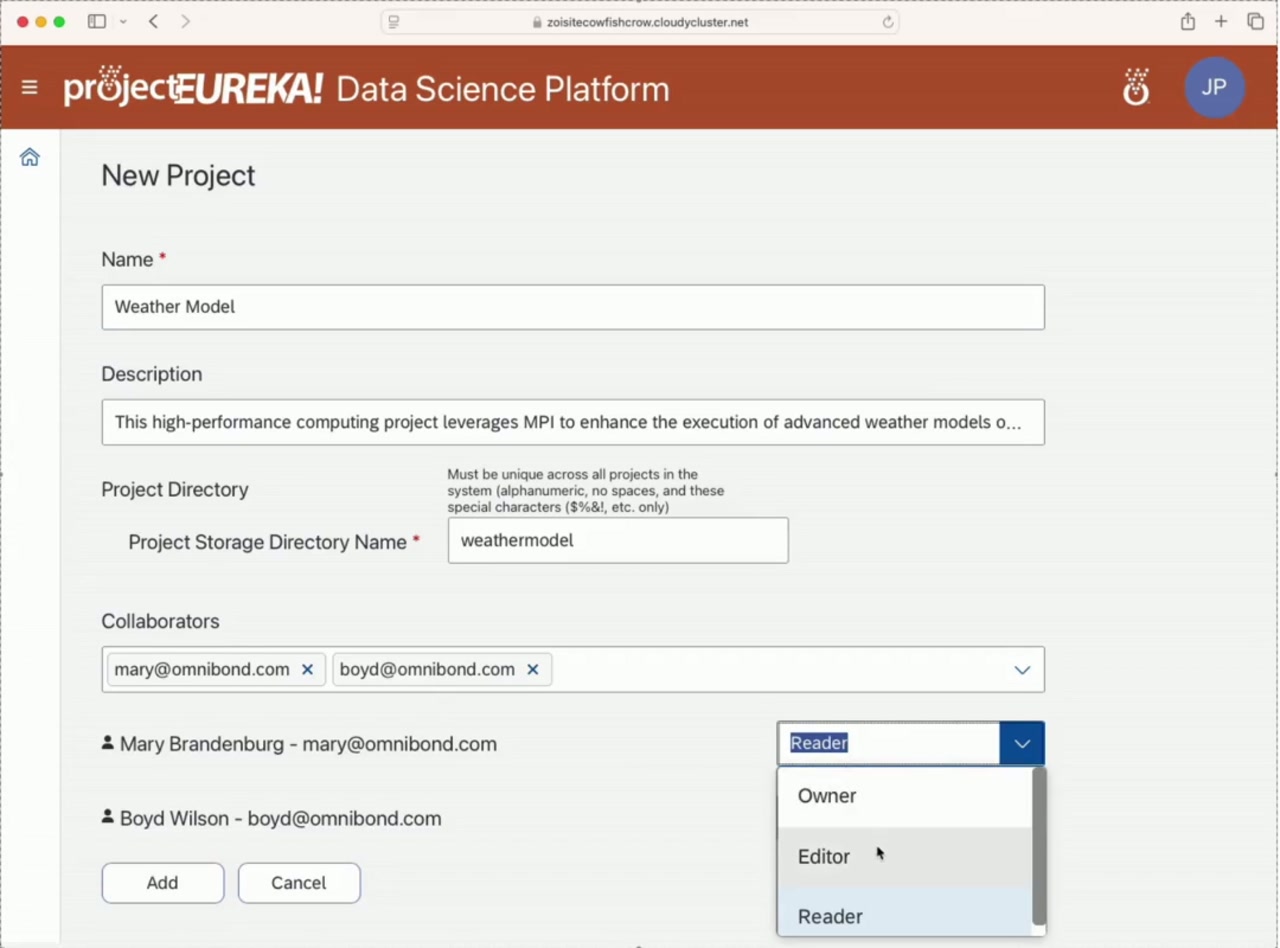
Create a project in projectEureka
Projects live inside your chosen environment

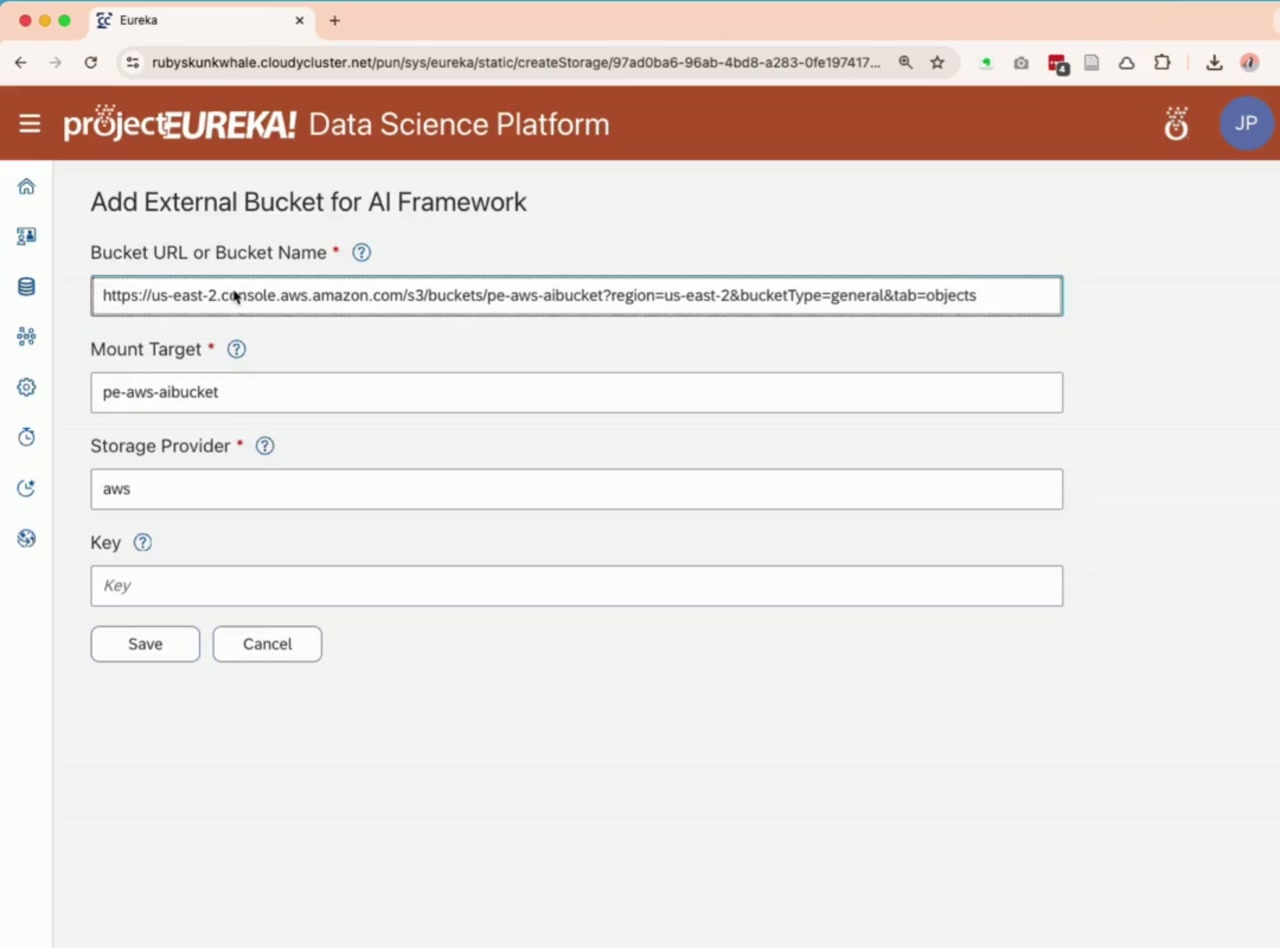
Project storage and multi-cloud buckets

Multi-cloud shows up in storage: home directories, project directories, and multi-cloud buckets you can attach no matter where the environment runs (AWS, GCP, or on-prem K8s).

  • Home directory: Personal space for the user inside the environment.
  • Project storage: A project directory that stays with the team workspace.
  • Multi-cloud buckets: AWS S3 and GCP GCS, usable wherever the environment runs.
  • Managed bucket: This picture is Google Cloud Storage. On AWS, the same action creates an Amazon S3 bucket. Set the location, keep older versions, allow public read, or serve a small website.
  • Project-based access: Permissions follow the project.
  • OrangeFS®
  • Copy inside a flow: Move files among project files, home, a project bucket, or a machine. A copy on a CPU or GPU stage runs with that job. A copy stage of its own is its own step. Saved flows →
Buckets and project storage under project control
Copy as its own step A copy stage of its own runs on a small machine. Each row is one source and one destination.
A managed bucket for the project This picture is Google Cloud Storage. On AWS, the same action creates an Amazon S3 bucket. Set the location, keep older versions, allow public read, or serve a small website.

Interactive apps and virtual workstations

App containers are the browser tools. A simple install downloads one from containers.projecteureka.ai onto this environment, then creates the app. Jupyter, VS Code, RStudio, ParaView, QGIS, Octave, Ollama, and a Linux desktop are in that list.

  • Launchers: The card shows cores, memory, GPUs, and an estimated price.
  • Choose a machine: Add an app and pick a machine that meets it.
  • Simple install: Download the app container once. Create the app from that download. Later projects on this environment reuse it.
  • On the card: While an app provisions or runs, stop it, delete it, or connect.
  • Persistent workspaces: Long-running work continues when devices sleep or leave campus.
  • Shared app model: The same launcher and workspace pattern spans teaching, research, and enterprise (licensing differs).
Desktop and notebook apps in the browser
Pick the machine A launcher shows cores, memory, GPUs, and an estimated price. Add an app and choose a machine that meets it.
Download, then create the app The catalog lists containers for this environment. Download one into the library, then create an app from that container.

Saved flows

A flow is a saved sequence of stages on a project. Submit runs that sequence once. The next stage only sees files the previous stage chose to share.

Start from an example Import a starter. A CPU job, a language-model step, a quantum simulator, or a short training job.
This stage runs a Slurm script Cores and memory are set on the stage. The script hands its out folder to a language-model stage. GPU is another kind of step.
Circuit, simulator, then a summary One flow writes a circuit, runs 32 shots on the simulator, and asks the model to read the counts.
Practice runs on the monitor The monitor groups practice runs by what they are doing: still running, stuck, failing the same way, still spending, or never started.

How a flow runs

New flow, Import, and Examples create or copy a saved flow. Save keeps it. Submit runs it once, and a second Submit keeps the first run's files.

Anyone on the project can run a flow that is already there and can stop a run they started. An owner or editor can create and edit a flow. The owner can delete the flow and can stop any run. A reader uses what is already saved.

Steps run in list order. A bar along the left runs those steps together, and the step under the bar waits for all of them. Each step has a checkbox, off by default, that can stop the whole flow when that step fails.

Project switches show or hide flow steps. They do not grant cloud permissions.

These switches show or hide flow steps. They do not grant cloud permissions. The simulator is on. The quantum processor is off.

CPU job

A script on a CPU machine. The machine type starts blank. Enter a duration to see an approximate price. The usual run is one script on one machine. The same step can become a small Slurm job when the script needs several machines or a job array.

GPU job

The same kind of script on a GPU machine. The GPU count comes from the machine type. The machine type starts blank.

Container

A setting on a CPU or GPU step. The list is images already downloaded onto this environment. An owner or editor downloads an image first. A reader can run a flow that already points at an image that is there.

Flow containers live on the same catalog: OpenFOAM, GROMACS, BLAST, PyTorch, TensorFlow, WRF, and others. Download the container, then choose it on the step. Sample flows on that site import into the project. A flow container stays on the step. Create an app when the container is meant to open in the browser.

File copy

Each row is one source and one destination: project files, home, a project bucket, or a machine. A copy attached to a CPU or GPU job runs with that job. A copy as its own step stands alone. This moves the bytes. The shared files are how one step hands a result to the next.

Language model

One call to the model enabled on this environment. The default is the inexpensive model, and the saved flow holds no cloud model id and no API key. The Edit tab is the instructions. Files from earlier steps are extra reading. The step writes a reply for the next step.

Language-model loop

The same call, repeated until the reply passes every check, or until the turn limit. The limit starts at 5 and stays between 1 and 20. The usual checks are that the reply is one JSON object and that its confidence is high enough. Only the latest reply goes to the next step. The loop stays inside this step, and the next step is still the next box.

Quantum

One circuit, then a count of the measured results for the next step. It starts on the simulator. The quantum processor stays off until an administrator allows it, and those shots cost money. The shot count starts at 100. The short examples use 32 or 64. If an earlier step wrote the circuit file, that file is the circuit for this run.

ML job

One managed training job. The step waits and writes a status file. A data location is optional. The short example has no dataset: it starts a real job, writes a small result, and exits. On Google Cloud the default asks for a TPU; an administrator can keep that example on CPU. On AWS the training machine is a small general-purpose type. The project needs a bucket.

Examples

A small CPU step can write a few result lines, and a loop can read them and stop when the reply names the top hit. A simulator can write counts, and a loop can say whether those counts look even. Ten CPU steps can sit under one bar, with one language-model step under the bar reading all ten. The same program on ten inputs can also be one CPU step that writes ten result files.

After Submit

The monitor shows each step as waiting, running, or done, with a duration. The files worth keeping are the script output, the model reply, the quantum counts, and the training status.

OrangeFS® storage

OrangeFS is an optional parallel file system for jobs that outgrow one shared folder or object storage.
  • Linux kernel integration: Native client path for high-performance mounts.
  • Distributed metadata: Scale-out architecture for aggregate throughput.
  • Multi-platform clients: Linux kernel, Windows client, and container mounting.

Commercial OrangeFS → · Community open source →

Storage resources view
Storage resources in the product UI

User-level security architecture

Each person signs in once, and that person's apps run as that person.

A shared sign-in page checks who they are. Each person's apps run in that person's own process, with a token that belongs only to them.
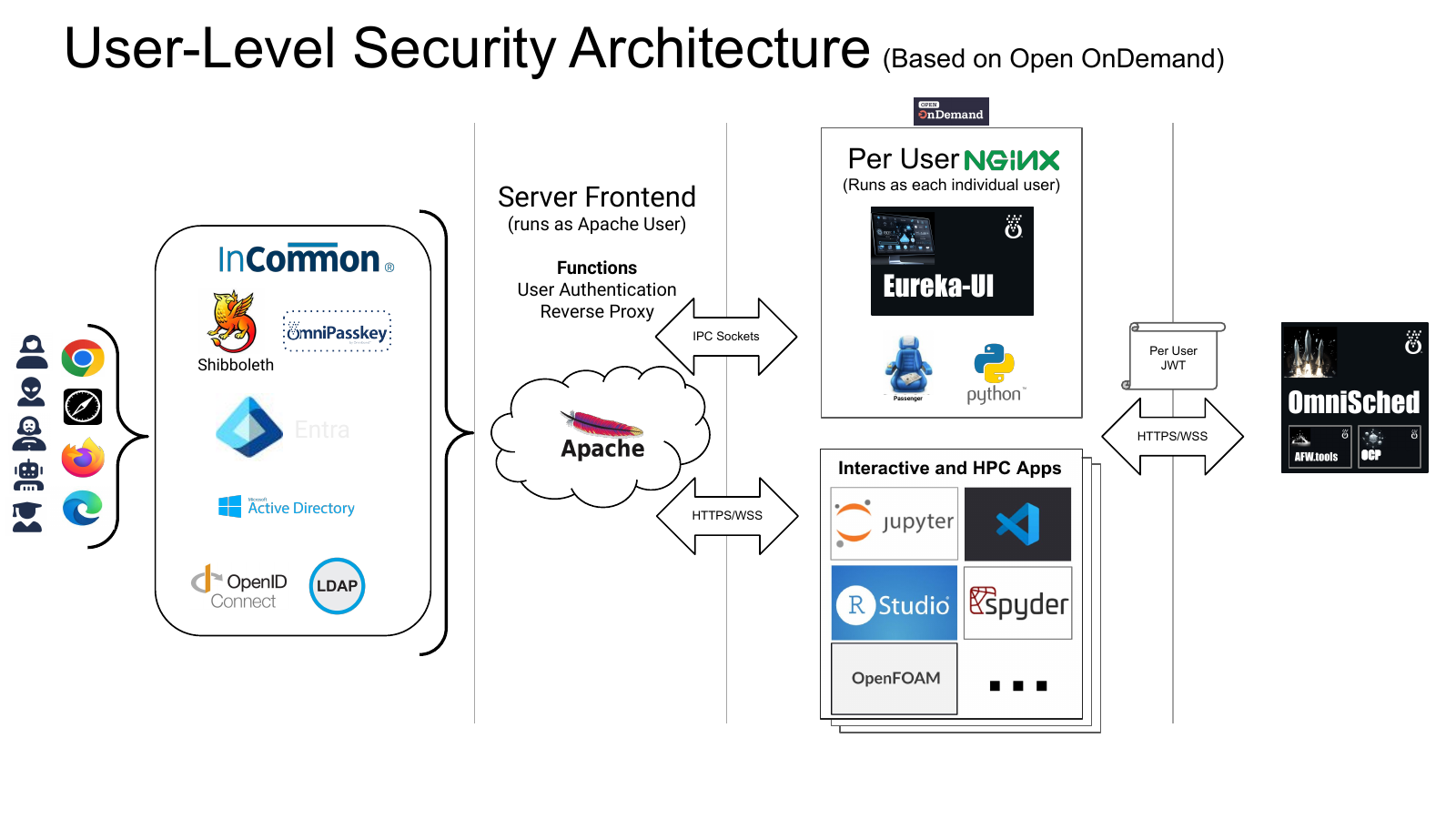
  • Identity: Federation and enterprise IDPs (Shibboleth, Entra, and related paths).
  • Server frontend: Authentication and reverse proxy (Apache user context).
  • Per-user NGINX: Runs as the individual user for app isolation.
  • Per-user JWT: Tokens scoped to the user for scheduler and app paths.
User-level security architecture based on Open OnDemand: identity providers, Apache frontend, per-user NGINX, Eureka-UI, and OmniSched
Based on Open OnDemand

Project-oriented architecture

A project holds the people, the apps, and the data.

Environment

AWS, GCP, or on-prem Kubernetes

Project

Name, description, collaborators, and access

Apps and jobs

Jupyter, VS Code, desktop, and terminal. Jobs keep running after the laptop sleeps, supervised from the browser.

Storage

Home directory, project storage, multi-cloud buckets (AWS S3, GCP GCS)

Teaching and research use free software (you still pay cloud or cluster costs). Enterprise is a separate licensed path on the same platform model.

Direction: building infrastructure for what’s next

projectEureka™ is shipping a clear “now” model. In parallel, Omnibond is investing in platform infrastructure so future capabilities can land on the same project. Items below are direction.

Now

  • One environment target: AWS, GCP, or on-prem Kubernetes
  • Project access: people, apps, and data
  • Multi-cloud buckets: AWS S3 and GCP GCS (more storage providers over time)
  • Browser apps & virtual workstations next to project data
  • Secure long-running work in the project environment
  • Saved flows: a saved sequence of stages. Submit runs it once and keeps the saved flow
  • CPU and GPU stages: one script on one machine. The instance-type field starts empty. The same CPU stage can switch to a small Slurm job for srun, MPI, more than one node, or a job array
  • Copy stages: move files among project files, home, a project bucket, or a machine. A copy on a CPU or GPU job runs with that job
  • Language model, quantum, and ML: each one is a cloud call from the control node
  • Managed buckets: a project bucket in Google Cloud Storage, with older versions, public read, or a small website
  • App catalog: app containers and flow containers from containers.projecteureka.ai. A simple install downloads one onto the environment
  • Launchers with a machine: cores, memory, GPUs, a price, and a machine that meets the app

Building toward

  • Job routing: smarter placement of work across queues and capacity pools
  • Dynamic filesystems per job: mounts and scratch that follow the workload
  • Additional platforms: more environment targets as the control plane matures, including Azure as future work. Supported deploys today remain AWS, GCP, and on-prem Kubernetes
  • Richer multi-environment orchestration: company-scale HPC experience applied to future job placement. PE today remains one environment target
  • Deeper agent workflows: lifecycle, supervision, and policy hooks for agentic AI and simulation jobs
  • Stronger parallel storage paths: including OrangeFS® and job-adjacent high-throughput I/O

Roadmap and infrastructure investments describe intent. Availability in teaching/research software or enterprise licenses is decided separately.

Omnibond company capability

Proven cloud HPC at extreme scale, the engineering depth behind projectEureka™ and the broader Omnibond portfolio.

Company capability Hurricane simulation

GCP Hurricane Simulation

Clemson evacuation modeling at leadership-class scale on Google Cloud.

Read story →

Company capability NLP supercomputing

AWS NLP Supercomputing

Large parallel topic-modeling experiments on EC2 Spot Instances.

Read story →

Company capability CFTR research

Blind PTM & Cystic Fibrosis

Cloud HPC reducing genome-wide protein searches from weeks to hours.

Read story →

Get started

Join the research free-software beta, or request an enterprise conversation about AWS, GCP, or on-prem Kubernetes.

We typically reply to credible requests within a couple of business days. Please use a work or institutional email.